Content
Investing in aCNC Laser Cutting Machine is a pivotal decision for any metal fabrication shop, signpost, or manufacturer. It represents a significant capital outlay with the promise of transforming productivity, precision, and capability. However, navigating the myriad of options—from different laser sources and power levels to bed sizes and automation packages—can be daunting. A misstep in selection can lead to underutilized capacity, unmet production needs, or an unsatisfactory return on investment. This comprehensive guide is designed to demystify the selection process. We will delve into the critical technological differences, help you understand the true fiber laser cutting machine price for metal, and provide material-specific advice, such as how to choose a CNC laser cutter for stainless steel. We'll also explore productivity-enhancing features like automation and discuss practical pathways, including when to use a local CNC laser cutting service near me for prototyping before committing to a purchase. By breaking down complex topics like the CO2 vs fiber laser cutter comparison table and highlighting the tangible benefits of automatic loading CNC laser cutter systems, this article aims to equip you with the knowledge needed to make a confident, informed decision that aligns with your business goals and workshop requirements for years to come.
The fundamental choice in laser cutting technology lies between traditional CO2 lasers and modern fiber lasers. Understanding this distinction is the first and most crucial step in the selection process. A CO2 laser generates its cutting beam by exciting a gas mixture (primarily carbon dioxide) within a sealed tube. This beam is then directed via mirrors to the cutting head. In contrast, a fiber laser creates its beam within a solid-state gain medium—a doped optical fiber—and delivers it directly to the cutting head through a flexible fiber optic cable. This core difference in beam generation and delivery leads to profound implications for performance, efficiency, and application. Fiber lasers typically offer superior electrical efficiency, often converting 30-50% of input power into laser light compared to 10-15% for CO2 systems. This results in lower energy costs and less heat generation. The wavelength of a fiber laser is also more readily absorbed by metals, particularly reflective ones like copper and brass, leading to faster cutting speeds on thin to medium sheets. CO2 lasers, while less efficient on thin metals, can provide a exceptionally smooth cut edge on thicker materials and are historically well-suited for cutting non-metals like wood, acrylic, and textiles. The decision between the two is not merely about picking the "better" technology, but the *right* technology for your specific material mix, thickness range, and desired cut quality.
| Parameter | CO2 Laser | Fiber Laser |
| Beam Generation | Gas mixture in a resonator tube | Doped optical fiber (solid-state) |
| Beam Delivery | Mirrors and beam path | Flexible fiber optic cable |
| Electrical Efficiency | ~10-15% | ~30-50% |
| Cutting Speed (on thin steel) | Good | Excellent (often 2-3x faster) |
| Reflective Metal Cutting | Challenging (requires special optics) | Excellent (high absorption) |
| Cut Edge Quality (on thick steel) | Very Smooth | Good to Very Good |
| Maintenance Requirements | Higher (mirror alignment, gas replenishment, tube replacement) | Lower (minimal moving parts, long-life source) |
| Consumable Costs | Higher (laser gases, resonator tubes) | Lower (primarily protective windows and nozzles) |
| Ideal For | Thick-section steel, non-metals, applications requiring supreme edge finish | Thin to medium sheet metal (esp. reflective metals), high-volume production, energy-conscious shops |
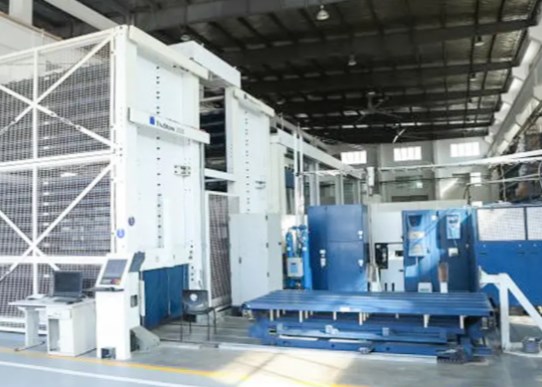
Understanding the fiber laser cutting machine price for metal requires looking beyond a single sticker price. The cost is a composite of several major subsystems, each varying in quality and capability. The laser source itself, measured in watts (e.g., 1kW, 3kW, 6kW, 12kW), is the single most significant cost driver. Higher power allows for cutting thicker materials and increasing cutting speeds on thinner gauges, but it comes at a premium. The machine frame and motion system—encompassing the gantry, drives, linear guides, and cutting bed—dictate the work envelope (bed size) and the machine's precision, stability, and longevity. A robust, well-engineered frame is critical for maintaining accuracy over years of service. The CNC controller is the brain of the operation; a user-friendly, powerful system with features like nesting software and remote monitoring adds value. Beyond these core components, hidden costs abound: professional installation and calibration, operator and programmer training, and the ongoing cost of consumables (assist gases like nitrogen or oxygen, nozzles, lens protectors). A thorough financial analysis should compare the Total Cost of Ownership (TCO) across different machines, factoring in purchase price, estimated energy consumption, maintenance contracts, and expected consumable use over a 5-year period. This holistic view reveals the true value proposition of a machine, separating a cheap initial investment from a cost-effective long-term partner.
Not all materials cut the same, and your primary workloads should directly inform your machine specification. For instance, knowing how to choose a CNC laser cutter for stainless steel involves specific technical considerations. The key challenge with stainless is preventing oxidation (scaling) on the cut edge, which compromises corrosion resistance and often requires secondary cleaning. To achieve a clean, oxidation-free ("bright") cut, high-purity nitrogen is used as the assist gas at high pressure. This exothermic reaction, instead blowing away molten metal. This process requires a laser with sufficient power and peak pressure capability to pierce and cut through the material. For thin gauges (under 3mm), a 1-2kW fiber laser with a high-pressure nitrogen system can produce excellent results. For thicker sections (6mm+), a 4-6kW laser becomes necessary to maintain cutting speed and edge quality. Conversely, cutting mild steel efficiently often utilizes oxygen as the assist gas, where the exothermic reaction actually adds heat to the cutting process, allowing for faster speeds and thicker capacity with a given laser power. Aluminum, being highly reflective and thermally conductive, is best cut with a fiber laser using nitrogen to prevent a rough, oxidized edge. The laser must have robust protection against back reflections, which can damage the optical system.
| Material | Thickness | Recommended Laser Type | Minimum Power for Quality Cuts | Key Assist Gas |
| Mild Steel | 1/4" (6mm) | Fiber | 2-3 kW | Oxygen (for speed) or Nitrogen (for cleaner edge) |
| Mild Steel | 1/2" (12mm) | Fiber | 4-6 kW | Oxygen |
| Stainless Steel | 1/8" (3mm) | Fiber | 1-2 kW | High-Purity Nitrogen |
| Stainless Steel | 1/4" (6mm) | Fiber | 3-4 kW | High-Purity Nitrogen |
| Aluminum | 1/8" (3mm) | Fiber | 2-3 kW | Nitrogen |
| Aluminum | 1/4" (6mm) | Fiber | 4-6 kW | Nitrogen |
| Brass / Copper | 1/16" (1.5mm) | Fiber | 1-2 kW | Nitrogen (specialized settings required) |
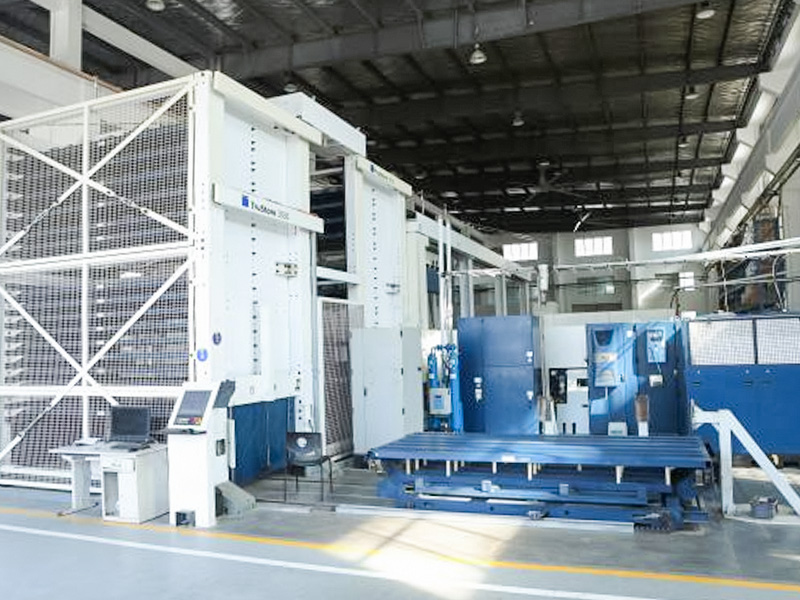
While the laser source does the cutting, it is the peripheral systems that often determine a machine's overall productivity and utilization rate. This is where understanding the benefits of automatic loading CNC laser cutter systems becomes critical. An automatic loading/unloading system, typically consisting of a material rack and a robotic arm or shuttle table, transforms the workflow. It allows the operator to program and nest jobs while the machine is cutting, and then safely load full sheets and unload cut parts with minimal manual intervention. The primary benefit is dramatically increased machine uptime; the laser can cut nearly continuously, as sheet changes happen in minutes instead of the 10-20 minutes required for manual handling. This leads directly to higher throughput and a faster return on investment. It also reduces labor costs per part and minimizes physical strain and safety risks for operators. For shops considering lights-out (unattended) production, automatic loading is a prerequisite. Beyond material handling, other advanced features contribute to efficiency: an automatic nozzle changer (ANC) switches cutting heads for different operations without stopping, a capacitive height sensor maintains optimal nozzle-to-plate distance over uneven material, and integrated fume extraction protects the optics and provides a safer work environment.
The journey to integrating laser cutting into your business doesn't always start with a purchase order. For many, especially startups, designers, or companies exploring new product lines, a pragmatic first step is partnering with a local CNC laser cutting service near me for prototyping. This approach offers immense flexibility and low risk. It allows you to test and refine designs, experiment with different materials and thicknesses, and validate market demand without a major capital commitment. A good service provider can also offer valuable feedback on design for manufacturability (DFM), suggesting tweaks to improve cut quality or reduce cost. When selecting a service partner, look for one with a range of machine capabilities (to match your potential future purchase), a reputation for quality and on-time delivery, and clear communication. They should provide detailed dimensional inspection reports for prototypes. This phase provides real-world data on cycle times and costs, which directly informs your eventual equipment purchase. When you are ready to transition, the experience gained ensures you buy a machine perfectly suited to your proven needs, not just anticipated ones.
Laser cutting involves multiple hazards requiring rigorous safety protocols. Laser Radiation: The primary hazard is the invisible, high-power laser beam, which can cause severe eye injury and ignite materials. Machines must have fully interlocked enclosures with safety-rated viewing windows that block the specific laser wavelength. Fumes and Particulates: Cutting metals and plastics generates hazardous fumes and fine particles. An integrated, high-volume fume extraction system is mandatory to protect operator health and keep optics clean. Fire Risk: Hot sparks and molten slag can ignite surrounding materials. Machines should have fire suppression systems, and the work area must be kept clear of flammables. Electrical Safety: High-voltage components require proper grounding and lock-out/tag-out procedures during maintenance. Comprehensive operator training covering all these aspects is not just advisable—it's a legal and ethical necessity.
Fiber lasers are known for relatively low maintenance, but a disciplined schedule is key to uptime. Daily: Operators should visually inspect lenses and nozzles for spatter, clean the cutting bed of slag, and check gas and coolant levels. Weekly/Bi-Weekly: This involves a more thorough cleaning of the lens assembly (using proper materials to avoid scratches), checking and cleaning the air filters for the CNC cabinet and laser source cooler, and inspecting linear guides and rails for debris. Every 6-12 Months (or per operating hours): A certified technician should perform a more comprehensive service, which may include checking laser gas purity (for CO2) or pump source performance (for fiber), calibrating the beam path, checking alignment of motion systems, and replacing wear parts like protective windows, filters, and possibly the focus lens. Adhering to the manufacturer's specific maintenance schedule is crucial for preserving warranty and maximizing machine life.
Yes, most modern CNC Laser Cutting Machines are fully capable of performing engraving and marking operations, making them highly versatile. The process involves defocusing the laser beam slightly and reducing its power significantly so it only removes a thin layer of material or causes a color change (annealing) on the surface without cutting through. This is controlled directly through the machine's CNC software, where you can define a separate "engraving" toolpath with different speed and power settings. This is perfect for adding part numbers, logos, serial numbers, or data matrix codes directly onto finished components. For extremely high-resolution marking (like detailed graphics on small electronic parts), a dedicated galvanometer-based laser marker is faster, but for the vast majority of industrial identification needs, your cutting laser is a more than adequate and cost-effective solution, eliminating the need for a separate dedicated machine.
CNC laser cutters are driven by vector-based file formats that define precise paths. The universal standard is the DXF (Drawing Exchange Format) file. This format contains clean, closed vector shapes (lines, arcs, circles) that the machine's nesting software can easily interpret as cut contours. AI (Adobe Illustrator) files are also commonly accepted, provided they are saved with outlines and not as live text or effects. Some systems can accept DWG files or even PDFs, but these can sometimes introduce errors if not exported correctly. The key requirements for any file are: 1) Closed Contours: Shapes must have no gaps for a continuous cut. 2) Correct Scale: The geometry must be at a 1:1 scale (e.g., 1 drawing unit = 1 mm). 3) Clean Geometry: Avoid duplicate lines, tiny segments, or overly complex splines. Most shops provide a template or checklist for file preparation to ensure smooth job processing.







 +86-13771171111 +86-13338110517

 English
 中文简体
中文简体 日本語
日本語 Deutsch
 Español
 Bahasa Melayu